
Facebook Ads Manager shows 287 conversions from last quarter's campaigns. Your CRM shows 12 closed deals with "Facebook" as the source.
Where did the other 275 go?
They didn't vanish…. Your sales team worked them, qualified them, and signed contracts. But somewhere between the Facebook click in March and the contract signature in September, the attribution broke.
All your CRM says now is "Website" or "Demo Request" or the useless "Other."
I’m not here to bash Meta. In fact, with ad revenues hitting over $100 billion in 2025, it’s a critical digital advertising budget. It tracks what happens on Facebook brilliantly. The problem is what happens after someone leaves Facebook and the journey through your website.
Stick with me for a 5 minutes, together we’ll walk though:
- What Facebook ad tracking actually does
- Where it breaks down for B2B attribution
- And how to build tracking that connects Facebook campaigns to CRM revenue
Not just clicks and conversions, actual closed deals with real dollar amounts.
How Facebook Ad Tracking Works

The native Facebook ad tracking infrastructure is sophisticated.
Every time one of its3.07 billion monthly active users visits your site after clicking an ad, a Pixel fires.
Cookies follow them across sessions.
The Conversions API sends server-side data that bypasses browser limitations.
Facebook's SDK tracks mobile app behavior.
There’s plenty of tech working for you behind the scenes. If you want to know which ad creative drives more conversions, the system is awesome.
For connecting revenue to your CRM six months later? That’s like playing pin the tail on the donkey; you’re blind.
Mechanisms of Facebook Pixels and Tracking
The Facebook Pixel (JavaScript code installed on your website) monitors visitor behaviour and sends data back to Facebook. Browser cookies store information about ad clicks and user sessions across multiple visits. Facebook's SDK in mobile apps tracks in-app behavior and conversions. The Conversions API sends server-side data directly from your backend to Facebook, working even when browser-based tracking fails.
These mechanisms create detailed pictures of user behavior on and around Facebook: who saw your ad, who clicked, who visited your landing page, who completed your form.
But it has limitations. These mechanisms track behavior on Facebook and your website. None of them follow prospects into your CRM, through your sales process, or into your closed-won reports. That handoff (from website conversion to CRM revenue) is where attribution dies for B2B companies.
Why Facebook Ads Manager Data Fails for Revenue Tracking
Facebook Ads Manager excels at what it was designed to do: optimize ad delivery and measure immediate conversions. It becomes dangerously misleading when you try to use it for full-funnel revenue attribution.
For B2B revenue measurement, that’s a problem. A most teams don't realize where the gaps are until budget season forces them to justify spend.

Gap #1: Facebook Sees Conversions, Not Revenue
Ads Manager reports 287 "conversions" - form submissions, content downloads, demo requests.
This is what it can't tell you:
- Which of those 287 leads were qualified versus tire-kickers collecting information?
- How many progressed to actual sales opportunities worth pursuing?
- How much revenue actually closed from each campaign?
- Which ad creative drove the $100K deal versus the leads that ghosted after two emails?
You're optimizing for conversion volume when you should be optimizing for revenue quality.
Consider two campaigns.
| Campaign A | Campaign B |
| generates 50 leads at $40 cost per lead. | generates 200 leads at $30 cost per lead. |
In Ads Manager, Campaign B looks like the winner: lower CPL, higher volume.
But if Campaign A's leads close at 15% with $75K average deal size, while Campaign B's leads close at 3% with $30K average deals, Campaign A generates 3x more revenue despite looking "worse" in Facebook's dashboard.
Facebook can't tell you this. Ads Manager stops at the conversion event.
Gap #2: The Multi-Touch Attribution Black Hole
This is what the timeline looks like in a real B2B buyer journey:
| Week 1: | Prospect clicks your Facebook ad promoting a webinar. They register. Facebook records a conversion. |
| Week 3: | They return via Google search and download a whitepaper. Your CRM updates the source to "Organic Search." |
| Week 5: | They attend your webinar. Source updates to "Webinar." |
| Week 8: | They visit your pricing page directly via bookmark. |
| Week 12: | They request a demo. CRM source updates to "Demo Request." |
| Week 16: | Deal closes for $85,000. Your CRM reports this as revenue from "Demo Request." |
In the end, Facebook gets zero credit. But without that initial Facebook ad creating awareness and driving the webinar registration, this deal never enters your pipeline.
This isn't an edge case.
B2B buyers interact with 7-12 touchpoints before purchase. Each touchpoint creates a form submission or CRM activity that can overwrite previous source data. Facebook Ads Manager can't track these multi-touch journeys.
Gap #3: Sales Teams Can't See Lead Context
Facebook Ads Manager shows that someone converted. It doesn't show sales teams the context that makes leads actionable.
Your sales rep receives: "John Smith, VP Operations, TechCorp" with a timestamp.
- Which ad creative resonated enough to make John click.
- What specific pain point the ad addressed.
- Whether John is researching for Q2 implementation or casually exploring options for next year.
Without this context, sales treats all Facebook leads identically when quality varies dramatically by campaign, audience, and creative. The hot lead from your "Enterprise Pain Point" campaign gets the same generic follow-up as the cold lead who clicked your broad awareness campaign.
Sales can't prioritize effectively and personalize outreach.
How to Properly Track Facebook Campaigns
Proper Facebook ad tracking requires bridging three separate systems: Facebook's ad platform, your website, and your CRM. None of these talk to each other automatically.

Here's how you start Facebook ad tracking properly:
1. Tag Your Facebook Ads with UTM Parameters
Instead of linking to yoursite.com/demo, use:
**yoursite.com/demo?utm_source=facebook&utm_medium=paid-social&utm_campaign=q1-enterprise&utm_content=video-pain-point**
These parameters identify the source (Facebook), channel type (paid social), specific campaign (Q1 enterprise), and creative variant (video about pain points).
To avoid chaos, use a UTM builder that enforces consistency. Trakt's UTM Builder uses dropdown menus instead of manual typing.
It's impossible to misspell "facebook" when you're selecting from approved values. Now everyone on your team creates Facebook campaign links the same way automatically.
2. Capture and Store Those UTM Parameters
When someone clicks your ad, those UTM codes need to stick with them, even if they leave your site and return days later. Your website needs to capture and remember: "This person came from Facebook's Q1 enterprise campaign."
Standard website tracking loses this data the moment someone closes their browser or returns via a different path. The UTMs only exist while they're actively in the URL.
Attribution tools like Trakt automatically capture and store UTM parameters on first click, then maintain that data across multiple sessions (even when prospects leave and return weeks later.)
3. Inject Attribution Data into Form Submissions
Here's where most setups break completely. The UTMs appear in the browser URL, but when prospects fill out your form, that data disappears. Your form captures name, email, company - but not campaign source.
Forms don't automatically capture URL parameters. You need hidden form fields that grab UTM values from the URL and include them in the submission. This typically requires JavaScript that most marketing teams can't write, forcing them to submit developer tickets for every new landing page.
Trakt's form enrichment works automatically. Add the tracking snippet to your website once. After that, Trakt reads URL parameters and populates hidden fields in real-time when forms load. New landing page? The snippet works there too. New tracking parameter? Already captured. No developer tickets required.
4. Sync Enriched Data to Your CRM
Form submissions need to flow to your CRM with complete attribution intact.
Instead of the useless "Website" or "Contact Form" label, they need to show "Facebook - Q1 Enterprise Campaign - Video Pain Point Creative".
Traktsyncs directly to your CRM while maintaining attribution integrity, even months after a lead clicks your Facebook ad.
5. Preserve Attribution Through the Entire Sales Cycle
When that lead fills out additional forms over the next few months (content downloads, webinar registrations, demo requests), each submission risks overwriting the Facebook source. Most CRMs use last-touch logic by default.
Attribution tools distinguish between "original source" and "most recent conversion", preserving both throughout the 6-12 month journey. When the deal closes six months later, your CRM accurately shows the Facebook campaign that deserves credit alongside all the touchpoints that influenced the sale.
Track Revenue on Facebook Campaigns with Trakt
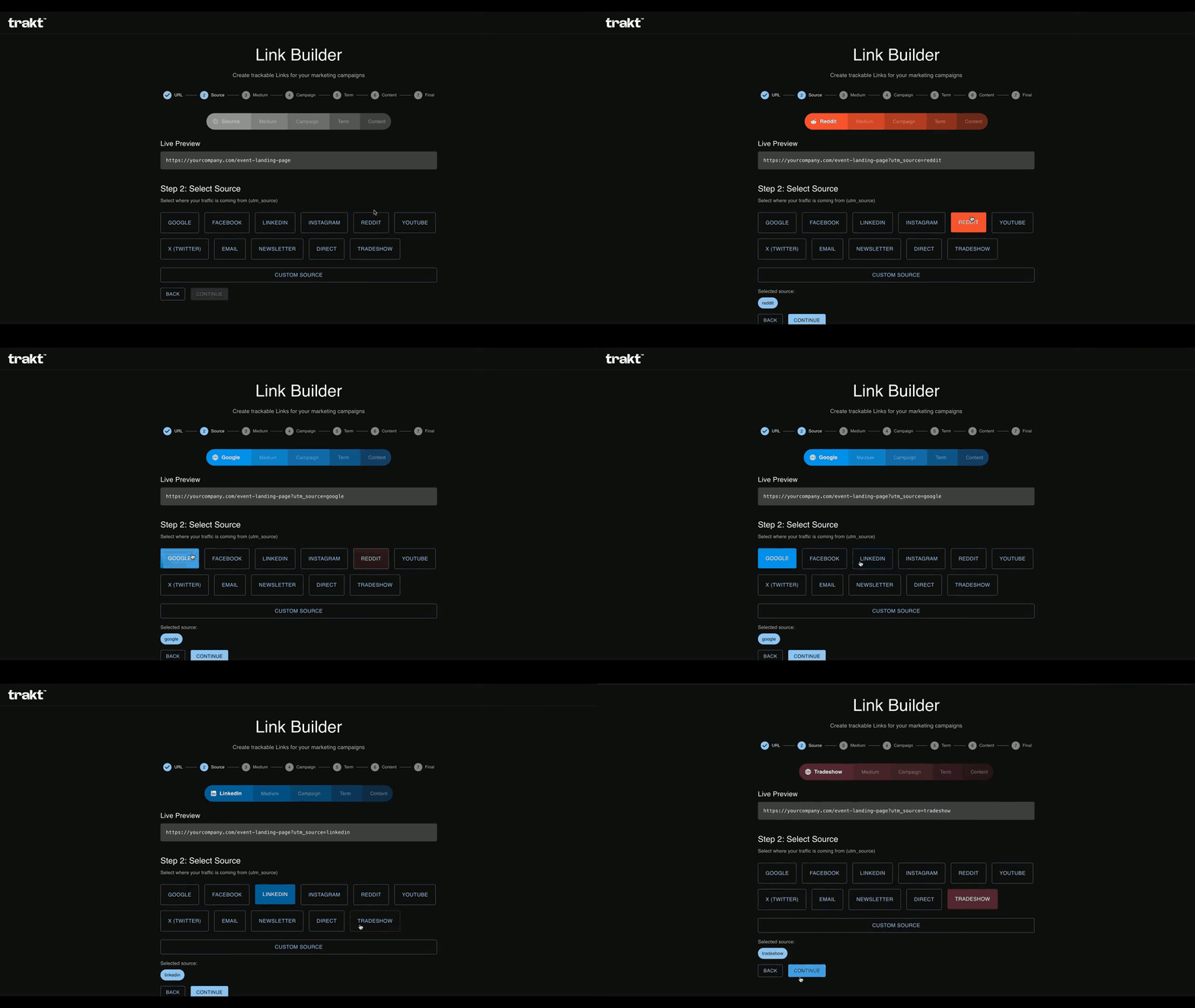
See how Trakt tracks Facebook attribution automatically from ad click to closed deal, maintaining clean campaign data through every touchpoint.
No spreadsheets for UTM management. No developer support required. No manual form configuration. Just complete facebook ad tracking and attribution that finally shows which Facebook campaigns drive revenue, not just which ones generate form fills.