
Facebook remains one of the most operationally important paid channels; not because it’s trendy, but because its targeting, scale, and data still drive measurable demand.
Meta’s ad targeting system is a beast. It’s so powerful now, that as a marketer you can focus on the important elements like creative and tracking while 'Zucks' algorithms take care of the rest.
So if you’ve got your ad creative ready, defined your targeting, now you just need to set up proper Facebook UTM tracking and facebook UTM parameters before going live.
Most teams actually get UTMs wrong. And trust us, you want to get these right. If you’re running Facebook ads without disciplined UTMs, you’re paying for demand you can’t prove, and leads your CRM can’t explain.
So, together we’ll walk through Facebook UTM tracking, how to build UTMs, and a ‘cheat code’ tool that automates everything
What Is Facebook UTM Tracking and Facebook UTM Parameters
UTM parameters are tags you add to the end of URLs in your Facebook ads. They tell your analytics and CRM exactly where traffic came from.
Here's what it looks like:
Before:
yoursite.com/landing-page
After:
yoursite.com/landing-page?utm_source=facebook&utm_medium=paid-social&utm_campaign=spring_sale
The added part after the question mark is the foundation of your tracking system.
They enable you to track which Facebook campaign someone clicked, the ad set they came from, and which specific creative drove the action. All of this should show in your analytics tools and (if set up correctly) in your CRM alongside lead records.
UTMs aren’t analytics metadata. They’re the only thing telling your CRM why a lead exists.
Common Mistakes in Facebook Ads UTM Tracking and Attribution
Let's talk about what always breaks with Facebook and UTMs.
The Facebook Pixel Limitation
The Facebook Pixel tracks conversions on your site. It tells Facebook which ads drove results which is great for optimizing within Ads Manager.
However, it doesn't tell your CRM which specific campaign or ad set drove each lead. Your sales team ends up with leads labeled "Facebook" with zero context. Which campaign? Which audience? Which message resonated?
They're completely blind.
Result: Facebook optimizes fine. But your CRM learns nothing.
The Multi-Touch Problem
Let’s say someone sees your Facebook ad on mobile Monday. Clicks it. Doesn't convert.
Wednesday, they see a retargeting ad on desktop. Clicks that. Fills out a form.
Without UTMs, your analytics show two separate sessions from two different devices with no connection between them. The original ad that started the journey gets zero credit.
Result: Facebook optimizes fine. But your CRM learns nothing.
The CRM Attribution Gap
You're running six different Facebook campaigns simultaneously:
- Brand awareness to cold audiences
- Retargeting to website visitors
- Lead gen to lookalike audiences
- Event promotion to engaged followers
- Product launch to email list
- Seasonal offer to past customers
They all drive leads into your CRM. Every lead shows up as "Facebook" or "Social" with identical source data.
Sales can't tell which campaigns drive quality leads versus junk. Marketing can't prove which audiences convert. You keep spending on underperformers because you're making budget decisions blind.
Result: Facebook optimizes fine. But your CRM learns nothing.
The Five UTM Parameters You Need to Know

Facebook gives you plenty of reporting inside Ads Manager, but UTM parameters are the only way to carry campaign context into your analytics and CRM.
These five fields are the foundation of clean Facebook attribution. Get these right, everything downstream improves.
utm_source, where the traffic came from
This identifies the platform that sent the visitor.
- Example:
facebook - What it tracks: The origin of the traffic
- Best practice: Always use lowercase
facebook. Never use variations like “Facebook,” “FB,” or “fb.” Even small inconsistencies split your data into separate buckets.
This is your primary source identifier. Treat it as non-negotiable.
utm_medium, how the traffic arrived
This describes the type of channel delivering the click.
- Example:
paid-social(orcpc) - What it tracks: The marketing channel type
- Best practice: Choose one convention and stick to it.
- Use
paid-socialif you want consistency across social platforms - Use
cpcif all paid ads are grouped together in your reporting
Inconsistency here is one of the fastest ways to corrupt attribution.
utm_campaign, what you’re promoting
This ties the click to a specific initiative or campaign.
- Example:
spring_sale_2025 - What it tracks: The campaign or launch
- Best practice: Match this exactly to your Facebook campaign name. Use lowercase and underscores instead of spaces (
spring_sale_2025, not “Spring Sale 2025”).
Clean campaign names make cross-referencing ads, analytics, and CRM data effortless.
utm_content, which variation worked
This adds detail about how the campaign performed.
- Example:
lookalike_audienceorvideo_testimonial - What it tracks: Ad set, creative variant, or A/B test
- Best practice: Use this to differentiate either:
- Audiences (lookalike vs interest targeting), or
- Creative formats (video vs carousel)
This is where performance insights live, if you use it consistently.
utm_term, optional, but sometimes useful
Originally built for paid search, this parameter is optional for Facebook.
- Example:
discount_offer_a - What it tracks: Additional ad-level detail
- Best practice: Most teams skip this. Use it only if you need an extra layer of granularity beyond campaign and content, for example, tracking specific ad copy variations.
If you don’t have a clear use case, leave it out.
Bottom line:UTMs only work when they’re boringly consistent. One naming system, enforced everywhere, is the difference between attribution you trust and reports you ignore.
Using Facebook Dynamic Tokens (Without Making a Mess)
Facebook lets you auto-populate UTM values using dynamic tokens. These pull campaign, ad set, or ad names directly from Ads Manager and insert them into your URLs automatically.
This is powerful and dangerous, depending on how disciplined your naming is.
Below is how dynamic values map to each UTM parameter when they’re actually useful.
utm_source, usually static
- Value:
facebook - Dynamic token: ❌ Not needed
This should almost always be hardcoded. Using a token here creates unnecessary variability and breaks reporting consistency.
utm_medium, usually static
- Value:
paid-socialorcpc - Dynamic token: ❌ Not needed
Like utm_source, this should be fixed and standardized across every ad.
utm_campaign, ideal for dynamic tokens
- Value:
\{\{campaign.name\}\} - Example output:
spring_sale_2025 - Why it works: Campaign names are already structured in Ads Manager and usually change infrequently.
This is one of the safest and most useful places to use dynamic tokens, as long as your campaign naming convention is clean.
utm_content, best place for dynamic detail
- Value:
\{\{adset.name\}\}or\{\{ad.name\}\} - Example output:
lookalike_audienceorvideo_testimonial - Why it works: This gives you automatic visibility into which audience or creative drove the click.
Choose one level of granularity and stick to it. Mixing ad set and ad names across campaigns creates noise fast.
utm_term, optional, advanced
- Value:
\{\{ad.name\}\} - Example output:
discount_offer_a - When to use it: Only if you need another layer beyond campaign and content.
Most Facebook advertisers don’t need this. If you’re not actively analyzing it, don’t collect it.
A Word of Caution on Dynamic Tokens
Dynamic tokens only work if your naming conventions are already disciplined.
If your campaign names look like:
Spring SaleSPRING-SALEspring_sale_final_v3
Then dynamic UTMs will faithfully reproduce that chaos in your analytics and CRM.
Tokens don’t clean data.They scale whatever structure already exists, good or bad.
The Rule of Thumb
- Static values for
utm_sourceandutm_medium - Dynamic tokens for
utm_campaignandutm_content - Skip
utm_termunless you truly need it
Used correctly, dynamic tokens save time and reduce errors. Used carelessly, they automate inconsistency.
Facebook-Specific Dynamic Parameters (Advanced)
Facebook also provides dynamic URL parameters that auto-populate with campaign data. These can work alongside standard UTMs:
| Facebook Parameter | Dynamic Token | Example Value | What It Does |
| utm_id | {{campaign.id}} | 123456789 | Unique campaign ID from Facebook (useful for tracking campaigns across multiple platforms) |
| ad_id | {{ad.id}} | 987654321 | Unique identifier for the specific ad creative |
| adset_id | {{adset.id}} | 111222333 | Unique identifier for the ad set |
| placement | {{placement}} | feed, stories, right_column | Shows where the ad appeared (Feed, Stories, Audience Network, etc.) |
| site_source_name | {{site_source_name}} | facebook, instagram, messenger | Identifies which platform in Facebook's network delivered the ad |
When to use dynamic parameters If you're running massive campaigns with hundreds of ad variations, Facebook's dynamic tokens (like {{campaign.name}} or {{ad.id}}) auto-populate and save time. But they can create messy, unreadable URLs if not managed closely.
How to Set Up UTM Parameters for Facebook Ads: Step-by-Step
Create Your UTM Naming Convention
Before building any links, establish consistent rules:
Required conventions:
- Always use lowercase (facebook not Facebook)
- Use hyphens or underscores, never spaces (spring-sale or spring_sale)
- Keep names short and readable (spring_sale not ss_2025_q1_promo_v2)
- Match Facebook campaign names for easy cross-referencing
Standard structure for Facebook ads:
utm_source = facebook
utm_medium = paid-social (or cpc)
utm_campaign = [your_campaign_name]
utm_content = [ad_set_or_creative_name]
Document this convention and share it with your team.
Build Your UTM-Tagged URL
Starting URL:
[https://yoursite.com/landing-page](https://yoursite.com/landing-page)
Add parameters after a question mark:
[https://yoursite.com/landing-page?utm_source=facebook&utm_medium=paid-social&utm_campaign=spring_sale&utm_content=lookalike_audience](https://yoursite.com/landing-page?utm_source=facebook&utm_medium=paid-social&utm_campaign=spring_sale&utm_content=lookalike_audience)
Construction breakdown:
- Base URL:
[https://yoursite.com/landing-page`](https://yoursite.com/landing-page`)
- First parameter:
?utm_source=facebook
- Additional parameters:
&utm_medium=paid-social
- Continue pattern:
&utm_campaign=spring_sale
- Final parameter:
&utm_content=lookalike_audience
Pro Tip Use Trakt’s UTM Builder as a simple tool to build tracking links in seconds and avoid manual typing errors.
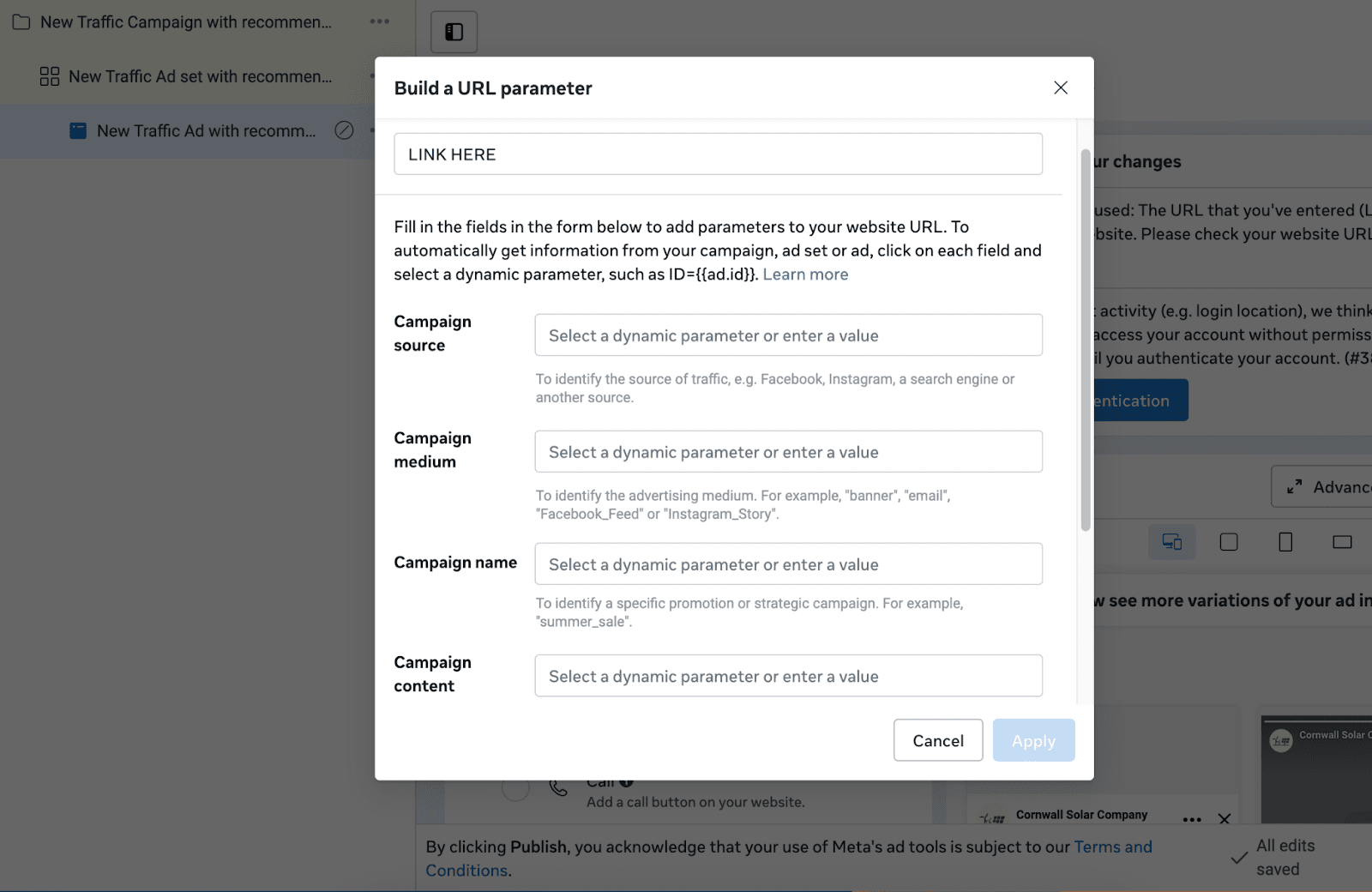
Add UTM Parameters in Facebook Ads Manager
-
Open Facebook Ads Manager
-
Navigate to the Ad level (not Campaign or Ad Set)
-
In the ad editor, find the "Website URL" field
-
Enter your landing page URL only:
https://yoursite.com/landing-page -
Scroll down to the "Tracking" section and expand it
-
Locate the "URL Parameters" field
-
Click "Build a URL Parameter"
-
Enter each parameter:
utm_source=facebook
utm_medium=paid-social
utm_campaign=spring_sale_2025
utm_content=lookalike_video
-
Click "Apply"
-
Publish your ad
Facebook automatically combines your landing page URL with the UTM parameters when someone clicks your ad.
Final URL users see:
[https://yoursite.com/landing-page?utm_source=facebook&utm_medium=paid-social&utm_campaign=spring_sale_2025&utm_content=lookalike_video](https://yoursite.com/landing-page?utm_source=facebook&utm_medium=paid-social&utm_campaign=spring_sale_2025&utm_content=lookalike_video)
Test Your UTM Tracking
-
Use Facebook's ad preview feature to view your ad
-
Click the preview link
-
Check your browser's address bar - verify all UTM parameters appear
-
Open Google Analytics → Realtime → Traffic Sources
-
Confirm your session appears with source
facebookand mediumpaid-social -
If your landing page has a form, fill it out with test data
-
Check your CRM to verify UTM parameters were captured
Why Manual Facebook UTM Building Breaks Down (And What To Do Instead)
Before you start building your Facebook Ad UTMs, there are several mistakes that inexperienced marketing teams make:
The spreadsheet problem. Someone creates a "UTM Master Sheet" in Google Sheets with formulas, drop-downs, and color coding. It looks beautiful.
Three months later, five people have edited it. Someone copied the wrong cell. Formulas broke. The drop-down for utm_medium now includes "paid-social," "Paid-Social," "paid social," "paidsocial," and "cpc" because nobody enforced consistency.
To make things worse, your analytics shows five different medium categories for Facebook ads. Your data is unusable.
Then there’s the time sink. You're launching 12 Facebook campaigns this quarter and each campaign has 3-5 ad sets. Because each ad set has 2-3 creatives, that's 72-180 unique UTM-tagged URLs you need to build.
Building them manually in spreadsheets eats hours. And every URL is an opportunity for typos.
The easiest fix is a UTM builder like Trakt that automatically enforces naming conventions across your links. You can create clean tracking links in seconds. Select your campaign and ad set quickly. Hit generate and you’re done. No manual typing. No typos. No chaos.
One source of truth that everyone uses. Your data stays clean.
From Clicks to CRM: Facebook Ad Attribution and Campaign Tracking
Facebook UTMs bridge the gap between ad performance and CRM attribution. But only if you implement them correctly.
What matters here:
- Consistent naming conventions enforced across your team
- Campaign-level hierarchy (campaign → ad set → creative)
- Testing before launch so you catch broken links
- Actually capturing UTMs in your forms (most teams miss this step)
UTMs only get you halfway there. They tag the URL with source data. Great. The other half is making sure that data flows into your CRM automatically, without manual work, and persists through multi-touch journeys.
When someone clicks your Facebook ad, returns three days later directly, then fills out a form, the data need to persist. The form needs to capture them. The CRM needs to receive them.
When UTMs are standardized, captured at submission, and synced to your CRM automatically, attribution stops being a task and starts being infrastructure.
Trakt automates all of this. Trakt turns UTMs from fragile tags into durable infrastructure. They're created once, captured automatically, and preserved through the full buyer journey.
Facebook will keep sending traffic whether you track it or not. The difference between scaling confidently and guessing blindly is whether your attribution survives the journey from click to CRM.
Facebook UTM tracking and facebook campaign tracking bridge the gap between ad performance and CRM attribution.
See how Trakt makes Facebook attribution automatic.