
Every B2B marketer running LinkedIn ads pays an invisible tax.
Not to LinkedIn. Not to your agency.
You pay it in lost attribution.
LinkedIn campaign tracking is broken for most B2B marketers, and it’s costing them revenue.
Someone clicks your Sponsored Content on Monday. They're intrigued but not ready. They bookmark your site and come back Thursday to download your pricing guide. Two weeks later, they attend your webinar. A month after that, they request a demo.
Four touchpoints. One journey. But your CRM only remembers the last one.
The demo request gets all the credit. LinkedIn, the channel that started the entire relationship, gets nothing. Budget season arrives, and LinkedIn looks like an underperformer.
You're not measuring LinkedIn's performance. You're measuring the last touchpoint.
That's not analytics. That's amnesia with spreadsheets.
Why LinkedIn Tracking Is Broken for B2B

Unlike impulse-driven B2C platforms, LinkedIn campaigns are long, multi-touch, multi-stakeholder journeys.
And with 85% of Linkedin ad spend coming from B2b accounts, tracking this cycle is critical.
Your prospect clicks Monday's Sponsored Content targeting VPs of Operations in manufacturing. Great targeting, qualified click. They visit your site, read three blog posts, then leave.
Wednesday, they return directly and download your ROI calculator. Source in your CRM: "Direct."
In week 3, they attend your webinar after clicking an email invitation. New source: "Email Campaign."
In month 2, they request a demo. Sales jumps on it. Final source: "Demo Request."
By month 5, the deal closes at $85,000. Your CRM attributes this to "Demo Request." LinkedIn, the channel that identified and engaged this prospect when they were in early research mode, gets zero credit.
Multiply across 50 deals, and LinkedIn suddenly looks like a lead generator that “never closes.” Meanwhile, "Demo Requests" look like your highest-performing channel. The last-touch illusion hides its real impact.
LinkedIn’s Campaign Manager shows impressions, clicks, and conversions, but it doesn’t track multi-touch revenue attribution.
That's the gap where tracking dies.
Why Standard LinkedIn Tracking Methods Fall Short
Most teams try one of three approaches first: LinkedIn's Insight Tag, manual CSV uploads, or API integrations.
These are legitimate tools, and you should probably use at least one of them. But none of them solve the attribution persistence problem.
Here's where each method breaks down:
| Method | What It Does | What It Misses | Best For |
| LinkedIn Insight Tag | JavaScript tracking code on your website. Captures conversions (form fills, downloads) and reports back to LinkedIn. | Can't track offline conversions or revenue from deals that close months later. 30-day attribution window misses long sales cycles. No multi-touch visibility. | Every B2B marketer needs this installed, but it's not enough alone. |
| Manual CSV Uploads | Export closed deals from your CRM, format per LinkedIn's template, upload to Campaign Manager. LinkedIn matches conversions to ad clicks via email addresses. | Manual work that doesn't scale. Uploads happen weeks after deals close. Matching accuracy depends on email alignment. Still no multi-touch journey visibility. | Small deal volumes (10-50/quarter) when you want to prove LinkedIn drives revenue without developer resources. |
| API Integration | Direct server-to-server connection (via custom dev or tools like Zapier) that syncs conversion data from your CRM to LinkedIn automatically. | Real-time sync solves the delay problem, but still doesn't preserve UTM-level granularity through multi-touch journeys. | Essential for companies spending $50K+/year on LinkedIn who need accurate ROI without manual work. |
All three methods get conversion data into LinkedIn. The Insight Tag tells LinkedIn someone converted. CSV uploads tell LinkedIn the conversion turned into revenue. API integrations automate the data flow.
But none of them solve the messy section between the LinkedIn click and the final conversion.
How to ACTUALLY Track Linkedin Campaigns
To capture revenue from LinkedIn campaigns, you need three core components working together:
UTM tracking in campaign URLs Every LinkedIn campaign gets a tracking URL that captures platform, ad format, campaign name, and audience variant. These parameters identify exactly which LinkedIn activity drove each visitor.
Automatic form enrichment: When prospects fill out any form on your site (even months after the initial click), the system automatically injects the original LinkedIn source data into hidden fields. This happens in real-time without anyone thinking about it.
Real-time CRM sync Attribution data flows directly into your CRM with every form submission. Sales sees exactly which LinkedIn campaign brought each lead. Marketing can track which campaigns drive revenue months later.
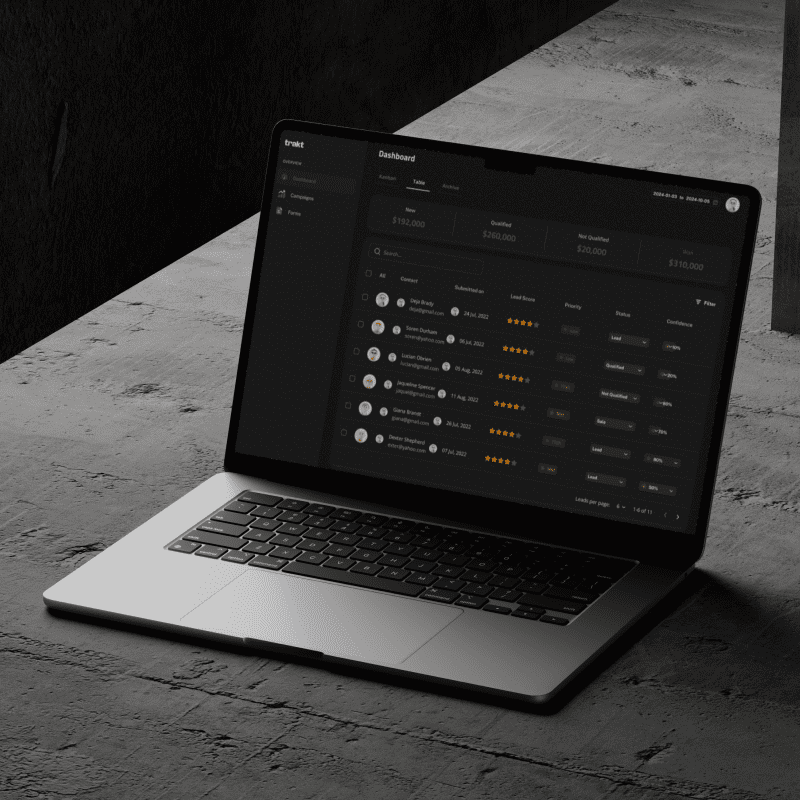
This is what Traktdoes. It sits between your LinkedIn campaigns and your CRM as an attribution middleware layer, preserving the original source through the entire journey.
How to Set Up Complete LinkedIn Campaign Tracking
Four steps to tracking LinkedIn campaigns from impression to revenue.
Step 1: Install the LinkedIn Insight Tag
Start with LinkedIn's Insight Tag. This gives you basic conversion visibility and enables retargeting audiences. Takes 15 minutes via Google Tag Manager.
In Campaign Manager: Account Assets > Insight Tag > Install. Copy the code.
In Google Tag Manager: New Tag > Custom HTML > Paste LinkedIn code > Trigger on All Pages > Publish.
You need this foundation even if you're building more sophisticated tracking on top. The Insight Tag powers LinkedIn's retargeting audiences and provides baseline conversion data.
Step 2: Build UTM-tracked campaign URLs
For every LinkedIn campaign, create tracking URLs using consistent UTM parameters:
- utm_source=linkedin (always)
- utm_medium= sponsored-content, sponsored-inmail, text-ad, video-ad, lead-gen-form
- utm_campaign= your campaign identifier (q2-enterprise-launch, ebook-promotion, webinar-series-march)
- utm_content= audience or creative variant (cfo-targeting, pain-point-a, video-version-2)
Example for Sponsored Content targeting CFOs:
yoursite.com/demo?utm_source=linkedin&utm_medium=sponsored-content&utm_campaign=enterprise-q2&utm_content=cfo-audience
Example for Sponsored InMail to VPs:
yoursite.com/resources?utm_source=linkedin&utm_medium=sponsored-inmail&utm_campaign=feature-announcement&utm_content=vp-operations
Use these URLs in Campaign Manager's destination URL fields. Never send LinkedIn traffic to generic URLs without UTM parameters.
Consistency matters. If one campaign uses "linkedin" and another uses "LinkedIn" and a third uses "LI," your data fragments into three separate sources in reports.
Step 3: Set up automatic form enrichment
This is where most teams fail. You need a system that captures UTM parameters when visitors arrive, stores them even when visitors leave and return later, and automatically injects them into every form submission.
Without automatic enrichment, your UTMs die the moment someone closes their browser and returns to your site directly.
Trakt handles this automatically. Add the tracking code once. Every form on your site including contact forms, demo requests, gated content, newsletter signups, and event registrations, automatically captures LinkedIn attribution data in hidden fields.
Step 4: Connect attribution data to your CRM
Traktenriches every form submission with complete attribution data automatically. When leads fill out forms, Trakt injects the UTM parameters into hidden fields in real-time. Those enriched form submissions then flow to your CRM.
Your CRM receives complete attribution with every form submission. No manual imports. No CSV uploads. No Friday afternoon data reconciliation. The attribution flows automatically through your existing form infrastructure.
With this setup, you can run CRM reports that answer:
- Which LinkedIn campaigns generated the most revenue this quarter?
- What's the average deal size by LinkedIn audience segment?
- How long does it take LinkedIn-sourced leads to close compared to other channels?
- Which specific ad creative variants drive the highest-value opportunities?
That's the data you need to optimize LinkedIn spend, not just guess based on clicks and form fills.
Stop Guessing. Track Revenue.
LinkedIn's targeting is wasted if you can't see revenue.
The invisible tax of lost LinkedIn attribution compounds quarterly. Every deal that closes without proper source data is a missed insight.
The fix is simple:
- UTM parameters
- Automatic form enrichment
- CRM integration
Trakt automates all three. Build URLs, capture UTMs, sync to CRM in real-time. No errors, no delays, complete revenue visibility.
Stop making six-figure budget decisions based on incomplete data.
Stop guessing. Make every LinkedIn click count