
The Keyword-Level Tracking Problem Nobody Talks About
Your Google Ads dashboard shows keywords bringing in clicks. Your sales team tells you where deals close. Somewhere between those two data points, the connection falls apart.
This isn't a technical limitation. Google Ads provides the tools you need. The issue is that most marketing teams stop collecting data at the campaign or ad group level, then wonder why they can't explain which keywords actually generated revenue. You optimize based on cost per click. You miss the keywords that cost more per click but close bigger deals. You cut budgets on "expensive" keywords that happen to pull in enterprise customers.
The difference between guessing at keyword performance and knowing it comes down to one practice: google ads keyword tracking at the individual keyword level, then connecting those keywords to actual CRM outcomes. When you track google ads keyword tracking properly, you stop managing ads in the dark. You see exactly which search terms your ideal customers use, which keywords your competition fights over that don't matter, and which ones you're underbidding.
This is what separates marketing teams that optimize their way to flat budgets from those that prove ROI and earn bigger ones.
Why Keyword-Level Attribution Matters More Than Click Volume
If you've been in B2B marketing for more than five minutes, you've heard the phrase "attributed revenue." What that really means is: we've tied a deal back to a marketing touchpoint. When most teams talk about attribution in Google Ads, they're talking about campaign-level or channel-level numbers. That's useful for your board, but it's not useful for your keyword strategy.
Here's why keyword level attribution changes everything. Imagine two keywords in your ads account. Both get 100 clicks per month. Both cost $10 per click. Identical metrics. But Keyword A pulls in customers who close deals worth $50k on average. Keyword B pulls in prospects who rarely convert to meaningful revenue. Your click data makes them look identical. Your revenue data makes them completely different.
When you implement proper keyword level attribution, you're not just categorizing traffic. You're building a direct line from the search terms people use to the deals they eventually close. That line lets you answer questions that matter: Should we bid higher on this keyword? Which keywords appear in our highest-value customer cohorts? Are we wasting spend on keywords that bring cheap clicks but expensive acquisition costs?
The mechanics are straightforward. It starts with UTM parameters that capture the keyword at click time, flows through to your CRM as each lead moves through your sales process, and resolves when a deal closes and you can finally say, "This customer came from that keyword."
How to Set Up Google Ads Keyword Tracking with UTM Parameters
The technical setup for capturing keywords in your ad clicks is simpler than most people think, but the details matter.
Start in your Google Ads account and navigate to your campaign settings. You're looking for the "Tracking" section and specifically the field labeled "Final URL suffix" or "Tracking template," depending on your account structure. This is where you'll add the UTM parameters that capture keyword data on every click.
The key parameter here is the one Google provides specifically for this purpose: \{keyword\}. This dynamic insertion placeholder automatically replaces itself with the actual keyword that triggered your ad. Your UTM structure should look something like this:
?utm_source=google&utm_medium=cpc&utm_campaign={campaignname}&utm_content={adgroupname}&utm_term={keyword}
The \{keyword\} parameter in the UTM structure ensures that every click landing on your site includes the exact keyword that generated it. This is what makes google ads keyword tracking actually possible, because without it, you lose the keyword information the moment the click happens.
When a user clicks your ad, they land on your site with a URL that now contains that keyword as a UTM parameter. Your analytics system picks it up. Your form submission or event tracking code captures it. When that prospect eventually becomes a customer, your CRM has a record of which keyword brought them in.
The second critical step is making sure your CRM actually receives this data. If you're using a form-based lead capture, your form fields need to include a hidden field that captures the UTM parameters. If you're using server-to-server tracking or a CDP, you need to ensure your destination system accepts and stores UTM data on contacts and accounts.
Many teams set up this part wrong. They add the UTM parameters to Google Ads, verify they appear in their analytics, then stop. They never confirm that the data actually reaches their CRM. That's the moment your google ads keyword tracking setup breaks, because your sales team is working from CRM data that doesn't include keyword information, even though your ads are capturing it.
There's also the matter of normalization. Different keyword matching types and devices can cause the same keyword to appear slightly differently in your UTM data. "Black hiking boots" and "black hiking boots near me" are similar but not identical. If your attribution system treats them as different keywords, you'll fragment your data unnecessarily. Establish a standard for how you'll normalize keyword names when you connect UTM data to your CRM, so that variations of the same intent roll up into meaningful keyword clusters.
Connecting Keyword Data to Revenue and Deal Closure
Capturing keywords in your ads is half the problem. The other half is making sure that data flows all the way through your sales process so you can ultimately connect it to revenue.
When a prospect fills out a form on your site, their contact record gets created in your CRM. If your form is pulling UTM parameters from the landing page URL, that keyword information gets attached to their record. Good. But many CRMs don't include this data by default, so you'll need to configure it.
If you're using Salesforce, HubSpot, Pipedrive, or another major CRM platform, you have options. You can use a CDP like Segment, RudderStack, or a simpler tool built specifically for this like Trakt to capture UTM data from every site visitor and sync it into your CRM with accurate keyword information attached to each contact record. The advantage of using a dedicated attribution middleware is that it handles the complex parts for you: it captures the keyword at click time, stores it even if a prospect takes multiple visits to convert, and syncs it to your CRM in a consistent format.
The alternative approach is to build form logic that grabs URL parameters and pushes them to your CRM during form submission. This works, but it only captures data from people who fill out forms on the same session they clicked your ad. It misses the scenario where someone clicks your ad, leaves, comes back a week later through a different channel, then converts. That person still originally came from your keyword, but they're not associated with it if you're only capturing data at form submission time.
Once the keyword data is in your CRM alongside your deal records, you can start running real analysis. Pull a report of your closed deals, segment by keyword, and calculate average deal size and win rate by keyword. That's when keyword ROI stops being theoretical and becomes something you can measure and act on.
You'll likely discover that your intuition about which keywords matter is partially wrong. High-volume keywords might show weak revenue outcomes. Expensive, low-volume keywords might punch way above their weight in terms of customer quality. Branded keywords might show up in nearly every deal, but they might also be keywords your competitors aren't bidding on as aggressively, so they represent opportunity for higher spend without increased competition.
This is where the actual optimization happens. Once you have search ads performance data connected to revenue outcomes, your bidding strategy, budget allocation, and keyword strategy start reflecting reality instead of speculation.
What Most Teams Get Wrong About Keyword-Level Tracking
The most common failure mode is incomplete data collection. Teams implement UTM parameters, see them in Google Analytics, and assume the system is working. But Google Analytics and your CRM are not the same place. A keyword that shows up in Analytics doesn't automatically show up in Salesforce or HubSpot unless you've explicitly configured the connection.
The second mistake is losing keyword data over time. If you're relying on UTM parameters captured only at form submission, you lose anyone who visits your site, leaves, then comes back and converts through a different channel. Your attribution system will credit the conversion channel they used on their return visit, not the keyword that originally brought them in. This is a major blind spot in google ads keyword tracking for any company with longer sales cycles.
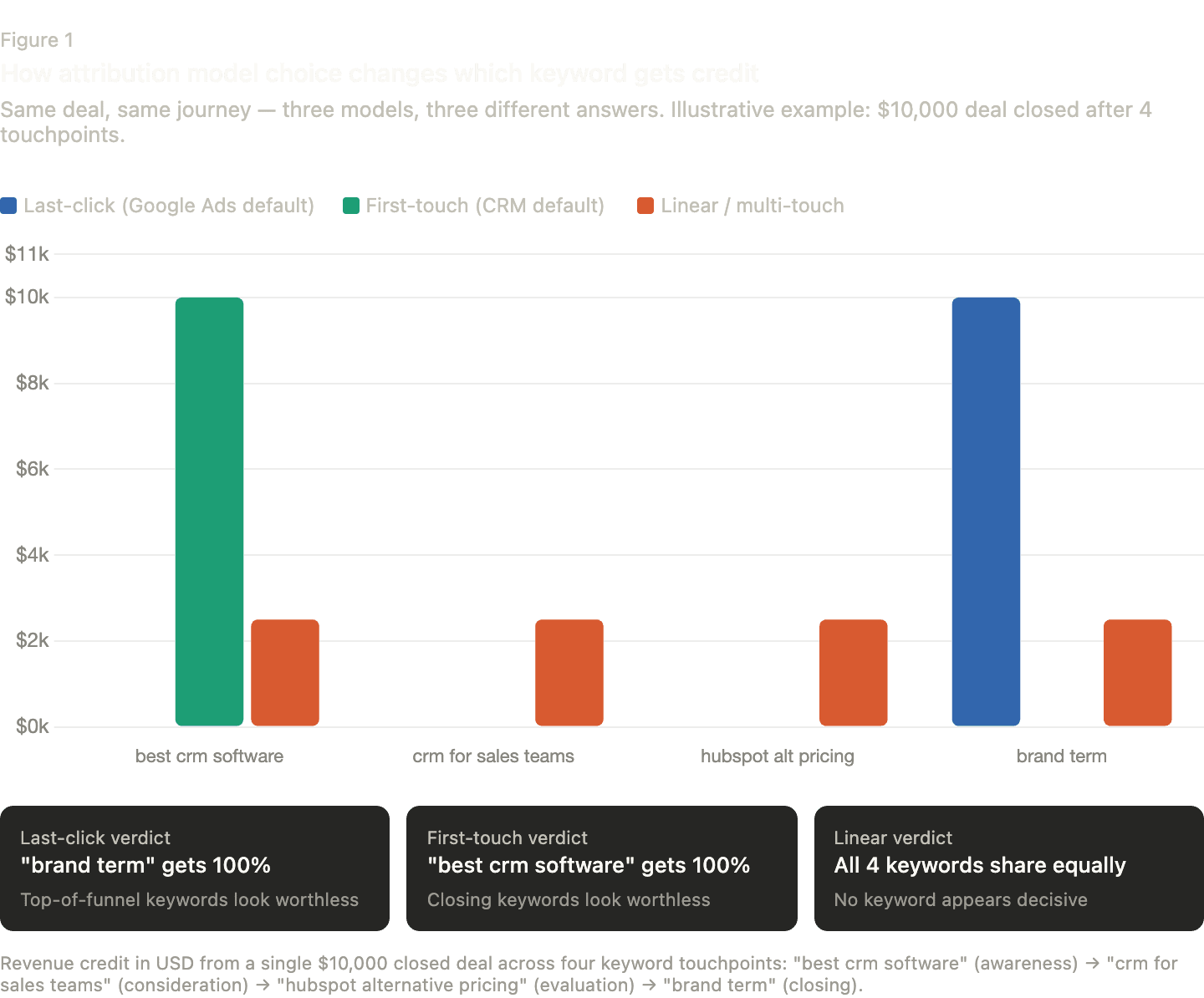
The third issue is mixing attribution models. Your Google Ads dashboard uses last-click attribution by default. Your CRM might use first-touch attribution. Your analytics platform might use multi-touch. When these don't align, you're comparing apples to apples while your stakeholders think you're comparing apples to oranges. Decide on one consistent attribution model for analyzing keyword level attribution or you'll spend more time explaining your discrepancies than solving problems.
Finally, many teams fail to account for the time lag between a click and a deal. If you're measuring keyword ROI by looking at keywords clicked on a specific day and comparing them to deals closed that same week, you're working with partial data. B2B sales cycles are long. A keyword that drives a deal closed three months later matters, but you won't see that impact if you're only looking at the first 30 days.
Ready to Connect Keywords to Revenue?
Capturing keywords in Google Ads is one thing. Making sure that data actually flows to your CRM and connects to deals is another. If your sales team is pulling reports from Salesforce or HubSpot and has no idea which keywords your closed customers came from, you're leaving real ROI data on the table.
Trakt captures every UTM parameter from your Google Ads clicks, including the {keyword} dynamic insertion, ties it to your CRM deals and contacts, and shows you exactly which keywords drove closed revenue. Set it up once and get search ads performance data connected to actual outcomes. That's how you move from hoping your keywords work to knowing they do.
Google Ads Keyword Tracking FAQ
How long does it take to see keyword-level attribution data in my CRM?
If you're starting from scratch, you'll have complete data within a sales cycle. For most B2B teams, that's 30 to 90 days. You'll see individual data points immediately, but patterns that actually inform strategy take time to accumulate. The delay isn't technical. It's just the lag between when someone clicks an ad and when they close a deal.
Can I use Google Ads conversion tracking instead of UTM parameters?
Google Ads conversion tracking is useful for managing bids, but it doesn't capture keyword information automatically. If you want google ads keyword tracking data in your CRM, you need to include keyword information in your landing page URLs, which means using UTM parameters or Google's ValueTrack parameters. Google Ads conversion tags can't push keyword data downstream to your CRM on their own.
Why is traditional badge scanning insufficient for B2B sales?
Traditional badge scanners capture commodity data (name, title, company) but fail to capture qualitative context. Without notes on the specific conversation, sales reps receive "cold" leads with no indication of priority or pain points. This leads to generic follow-ups that result in lower conversion rates compared to leads with rich conversation history.
How can I improve my tradeshow ROI tracking?
Improving ROI tracking requires moving away from "Manual Entry" sources. By using an integrated tool like Trakt, you can ensure that every booth conversation is tagged with its original lead source. This allows you to track a lead from the first pre-show ad click to the final closed-won deal, providing a clear picture of how much revenue was actually generated by the event.